AI Manager
Master Your AI Workflow. Never Lose a Conversation Again.
The complete AI conversation and prompt management system that helps you organize chats, save winning prompts, and build a personal AI knowledge base without scattered screenshots and forgotten breakthroughs.
You're using ChatGPT, Claude, Gemini, and other AI tools daily. You have brilliant conversations, discover perfect prompts, and generate valuable insights. Then you close the tab. Weeks later, you need that exact prompt or remember a conversation that solved a problem. But it's buried in endless chat histories across multiple platforms. You waste time recreating prompts from memory, losing momentum because you can't find what you already figured out once.
- Brilliant AI conversations lost in endless chat histories across multiple platforms - Perfect prompts you can never find again when you need them - No systematic way to organize and rate your best prompts - Switching between ChatGPT, Claude, Gemini without tracking what works where - Screenshots of prompts scattered across folders and notes apps - Recreating work because you forgot what prompt generated great results - No memory of which conversation produced that critical insight - Valuable AI breakthroughs disappear because there's no system to capture them
AI Manager transforms your AI interactions from scattered conversations into an organized knowledge base where every prompt, conversation, and insight is captured, rated, and retrievable when you need it. Instead of losing valuable work in chat histories, you save winning prompts with ratings and categories, track important conversations with outcomes and follow-ups, link prompts to conversations that used them, and organize everything across AI models. Your AI workflow becomes systematic, searchable, and compound; each conversation builds on previous breakthroughs.
What´s Included
Prompts Database
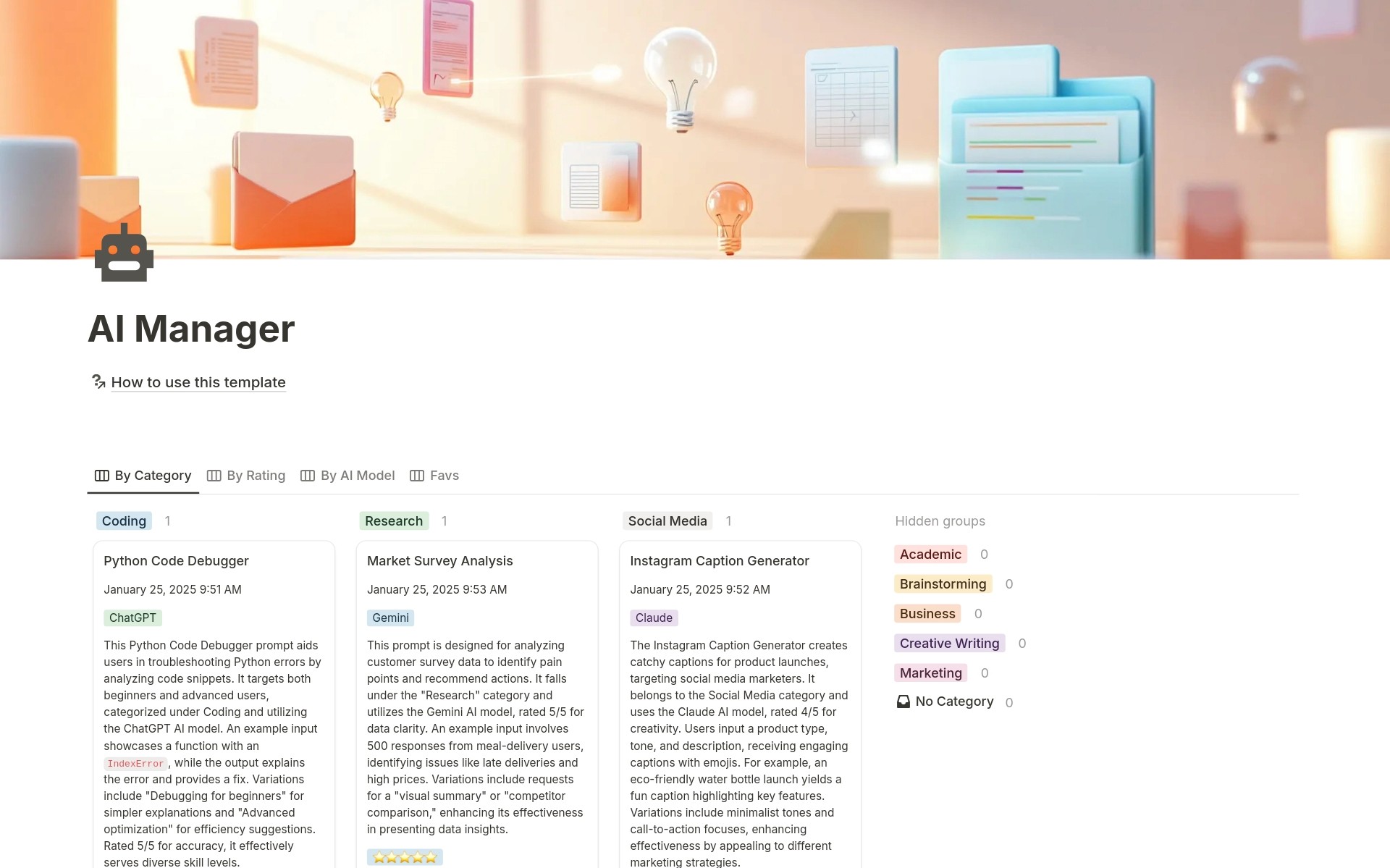
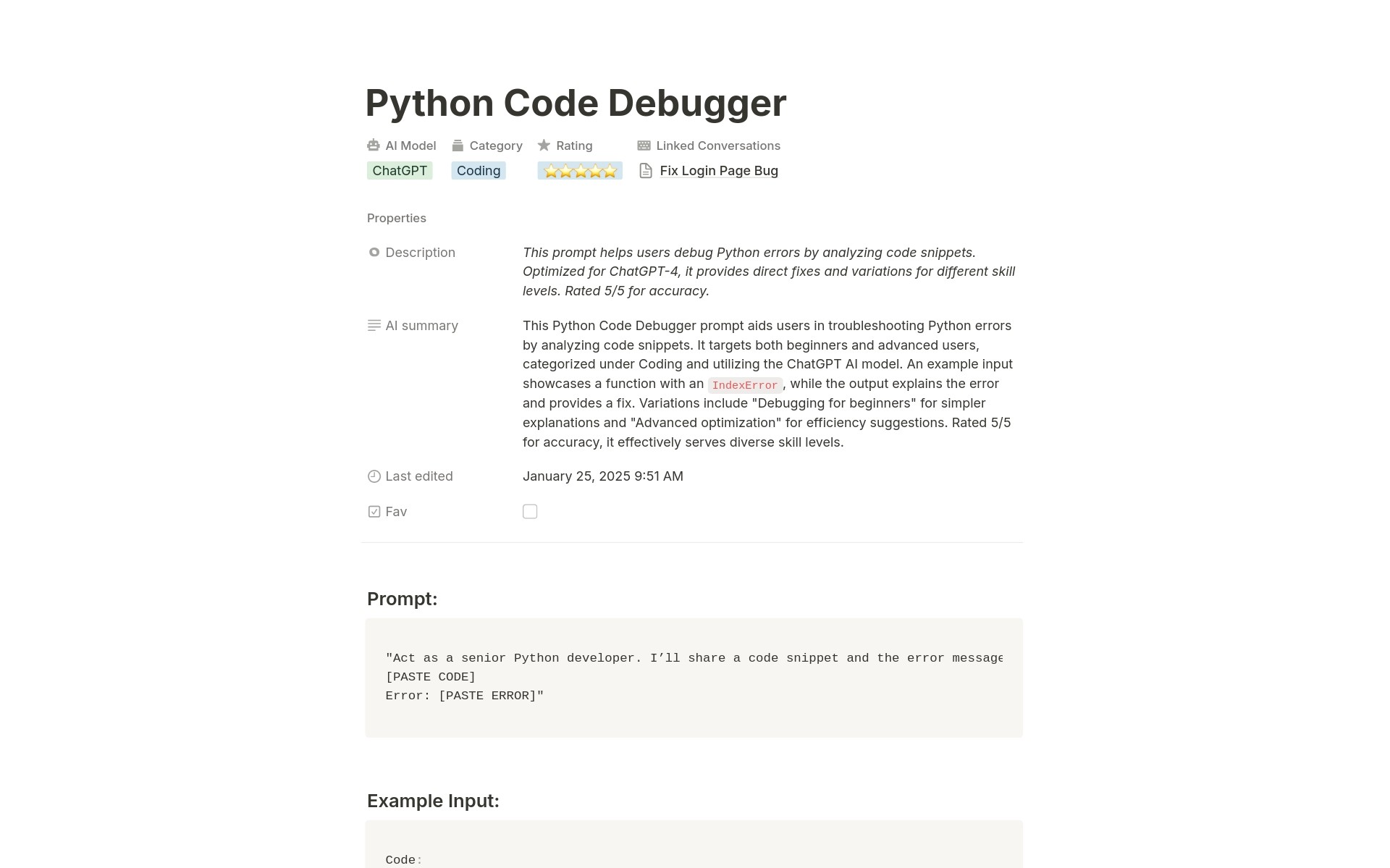
Your personal prompt library with names, descriptions, AI summaries, 5-star ratings, favorite marking, AI model tags, category tags, and relations to conversations where each prompt was used.
AI Conversations Database
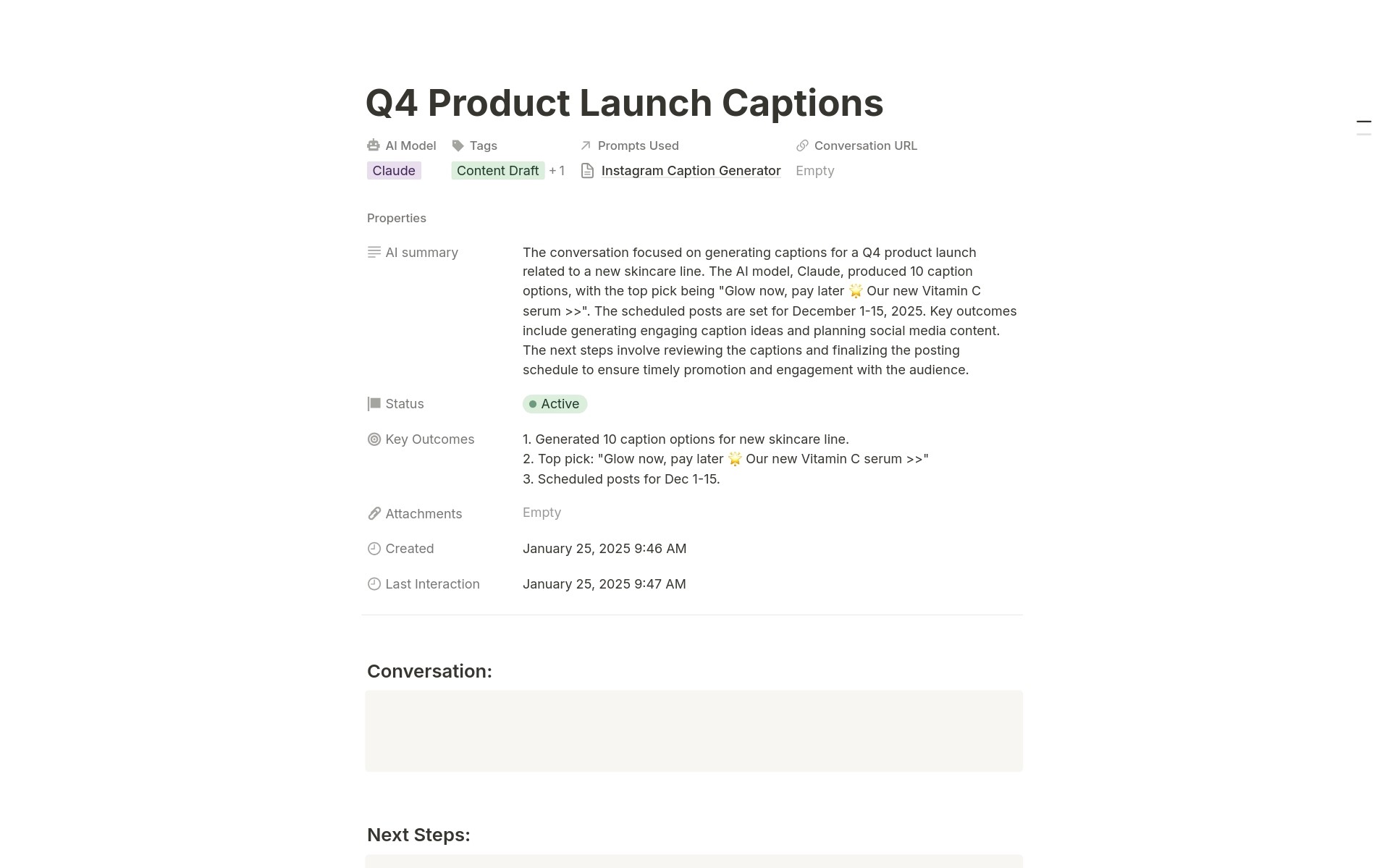
Track every important AI conversation with topics, conversation URLs, AI model tags, status workflow, conversation tags, AI summaries, key outcomes, attachments documentation, prompts used, creation dates, and last interaction timestamps.
Multiple Organizational Views
Prompts organized by Category, Rating, AI Model, and Favorites. Conversations organized by Status, AI Model, and Tags. See your AI knowledge from every angle.
Multi-Model Support
Track prompts and conversations across ChatGPT, Claude, Gemini, DeepSeek, DALL-E, Midjourney, and custom models. Know what works best on which platform.
Linked Intelligence
The prompts database connects to the conversations database through relations. See which conversations used which prompts and track prompt performance across actual usage.
Status Workflow for Conversations
Track conversations that need follow-up, are currently active, or should be archived. Never forget to continue important AI dialogues or lose track of ongoing research.
How It Works
Track Important Conversations
Create entries for AI conversations you want to remember. Save the conversation URL, summarize key outcomes, set status for follow-up, and link to any prompts you used.
Build and Reuse
When you need to accomplish something with AI, search your prompt library instead of starting from scratch. Review past conversations for context. Build on what already works.
In less than 15 minutes, you'll have a system that captures AI breakthroughs instead of losing them to chat history.
Key Features
Personal Prompt Library
Organized Prompt Storage
Save every effective prompt with a clear name and detailed description. When you need to accomplish something similar months later, search your library instead of recreating from memory or hunting through old chats.
AI-Generated Summaries
Use Notion AI to generate summaries of what each prompt does and when to use it. Future you will thank past you for clear documentation when selecting the right prompt.
Instant Favorites Access
Mark your absolute best, most-used prompts as favorites. The Favs view shows only your go-to prompts for instant access when you need proven results fast.
Smart Categorization
Multi-Dimensional Prompt Tagging
Tag prompts by category (Creative Writing, Coding, Research, Brainstorming, Business, Academic, Marketing, Social Media). When you need a marketing prompt, filter to Marketing instead of scrolling through everything.
AI Model Optimization
Tag which AI models work best for each prompt. Some prompts excel with ChatGPT, others with Claude, others with Gemini. Build model-specific knowledge about what works where.
Cross-Model Prompt Discovery
View prompts organized by AI Model in board view. See what you've developed for ChatGPT versus Claude versus Gemini. Identify gaps and optimize your toolkit across platforms.
Conversation Intelligence
Complete Conversation Tracking
Capture important AI conversations with topic names, conversation URLs, AI summaries, and key outcomes. Return to valuable dialogues months later with full context instead of vague memories.
Status Workflow Management
Track conversations that need follow-up, are actively ongoing, or should be archived. Board view organized by status ensures important conversations don't fall through the cracks.
Outcome Documentation
Record what you learned or achieved in each conversation. Transform ephemeral chats into institutional knowledge you can reference, share, or build upon later.
Connected Knowledge
Prompts-to-Conversations Linking
Link prompts to conversations where they were used through database relations. See which conversations used your 5-star prompts and track prompt performance across real usage.
Conversation-to-Prompts Reference
From any conversation entry, see exactly which prompts you used. Reproduce successful workflows by reusing the same prompt sequence that worked before.
Knowledge Compounding
Each saved prompt builds your library. Each tracked conversation adds context. Relations create a knowledge graph where everything connects, making your AI work compound instead of evaporating.
Advanced Tagging and Filtering
Multi-Purpose Tags
Tag conversations by purpose: Problem Solving, Content Draft, Research, Brainstorming, Social Media, Data Analysis. When you need ideas for similar work, filter by tag to find relevant past conversations.
Follow-Up Management
Tag conversations that require follow-up. The status system surfaces these in the Follow-up Needed column so you never forget to continue important dialogues.
Cross-Platform Organization
Track which AI model (DeepSeek, GPT-4, GPT-3.5, Claude, Gemini) you used for each conversation. Compare results across platforms and optimize your model selection strategy.
Visual Organization
Board Views Throughout
Kanban-style boards make browsing prompts and conversations feel natural. Drag and drop to change ratings, update status, or reorganize categories.
Multiple View Options
Prompts are viewable by Category, Rating, AI Model, or Favorites. Conversations viewable by Status, AI Model, or Tags. Choose the organization that matches your current need.
Clean, Intuitive Interface
Two focused databases instead of overwhelming complexity. Prompts and Conversations each have clear purposes and simple workflows that make daily use effortless.
Perfect For
Power Users of AI Tools
Using ChatGPT, Claude, Gemini, and other AI daily for work and need systems to capture what works instead of losing breakthroughs.
Content Creators and Writers
Leveraging AI for writing, brainstorming, and editing, and need organized prompt libraries plus conversation history for reference.
Developers and Programmers
Using AI coding assistants regularly and wanting to save effective coding prompts, debugging strategies, and technical conversations.
Researchers and Analysts
Conducting research with AI and needing to track conversations, document insights, and build reusable research prompt libraries.
Marketers and Strategists
Generating marketing content, social media posts, and strategy with AI, and wanting organized prompt collections that improve over time.
Anyone Using Multiple AI Models
Switching between ChatGPT, Claude, Gemini, and others, and needing centralized tracking of what works where.
Stop Recreating. Start Reusing.
AI Manager gives you an organized prompt library with 5-star ratings so you find what works reliably, conversation tracking that captures outcomes and insights, connected databases that link prompts to the conversations where they performed, and multi-model organization across ChatGPT, Claude, Gemini, and more, so your AI breakthroughs compound instead of evaporating. Are you ready to stop wasting time recreating prompts you already perfected and start building a knowledge base that makes every AI interaction more valuable than the last?