Design Agency Client Briefs
Capture. Clarify. Create. Deliver.
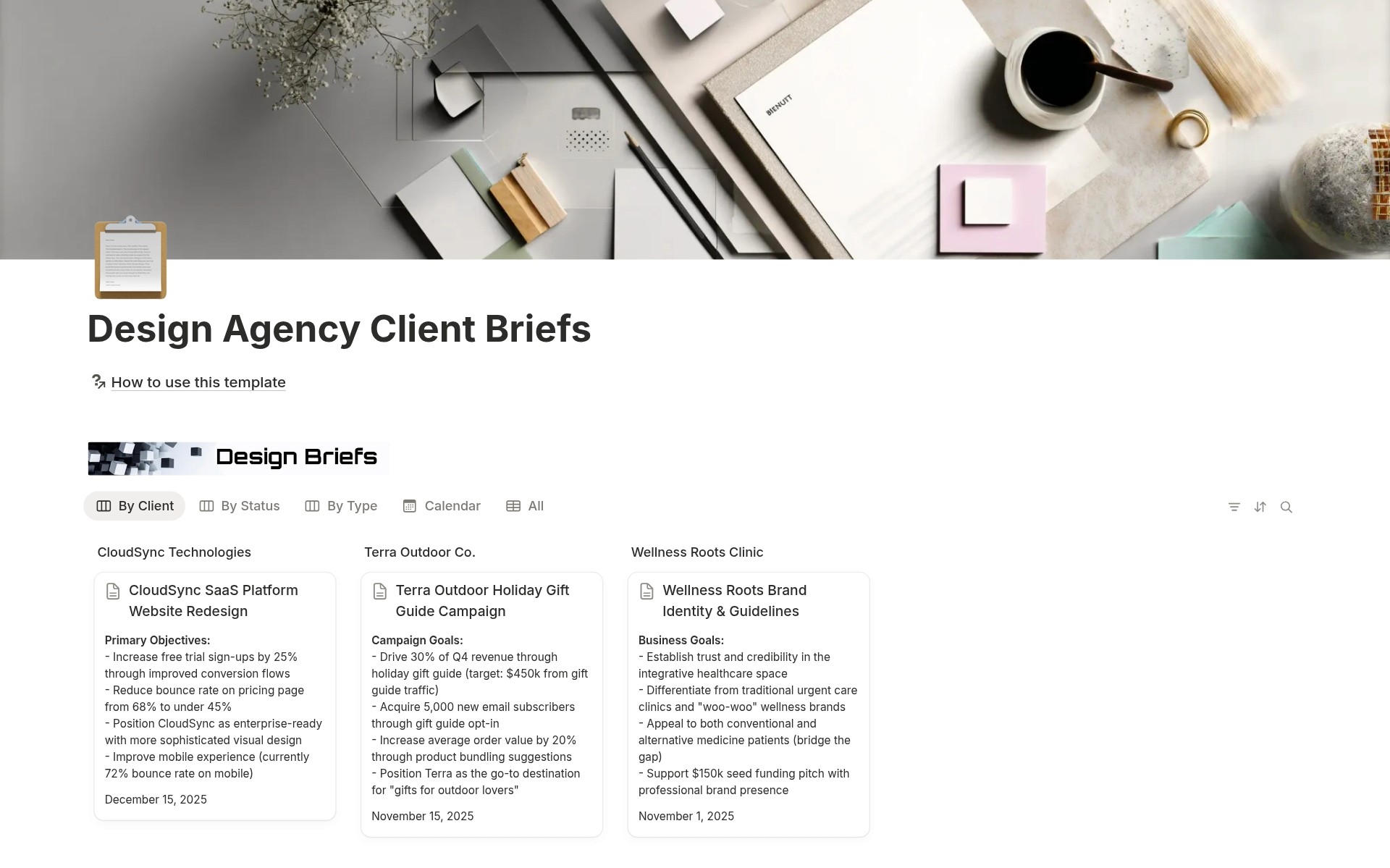
The complete client brief management system for design agencies who need structured intake, clear project scopes, and organized client information without scattered Google Docs, lost email threads, and miscommunication disasters.
You win a new design client. Exciting! Time to kick off the project. The client sends the scope via email. "We need a website redesign. Modern look. The target audience is millennials. Budget is flexible." You start designing. Client feedback: "This isn't what we wanted. We said bold colors. Our audience is Gen Z, not millennials. And the budget was $15K max." You check the email thread. 47 messages. Contradictory information. Missing details. No single source of truth. Project scope creeps. Timeline extends. Client frustrated. Team confused. Profit margins evaporate.
- Client brief information scattered across emails, Slack, meeting notes, and Google Docs - Missing critical project details (goals, constraints, success metrics, target audience) - Scope creep because the initial requirements weren't documented clearly - Team members asking "What did the client actually ask for?" mid-project - No standardized intake process for capturing client information - Can't find brand guidelines, asset folders, or reference materials when needed - Miscommunication disasters because there's no single source of truth - Feeling like every project starts chaotically instead of strategically
Capture all client information in one place during kickoff, define clear scope and out-of-scope boundaries, document goals and success metrics upfront, link to brand guidelines and asset folders, track through status workflow from draft to approved, organize by client/type/status views, and reference throughout project lifecycle. Miscommunication eliminated, scope creep prevented, team alignment automatic.
What´s Included
Priority System
Three priority levels with color coding. Manage workload and focus on urgent briefs.
8 Channel Options
Multi-select channels property: Website, Mobile App, Email, Social, Ads, Print, In-Product, Other. Document where design work will be executed or distributed.
Scope Definition Framework
Two text fields: Scope and Out of Scope. Prevent scope creep by defining boundaries upfront. Reference during the project when the client requests additions.
Success Metrics Field
Document how project success will be measured. "Increase conversion rate by 25%," "Launch by Q2," "Improve brand recognition." Align team and client on desired outcomes.
Timeline Management
Start Date and Due Date properties. Calendar view shows project timelines. Never miss deadlines. Plan capacity.
How It Works
Capture Project Information
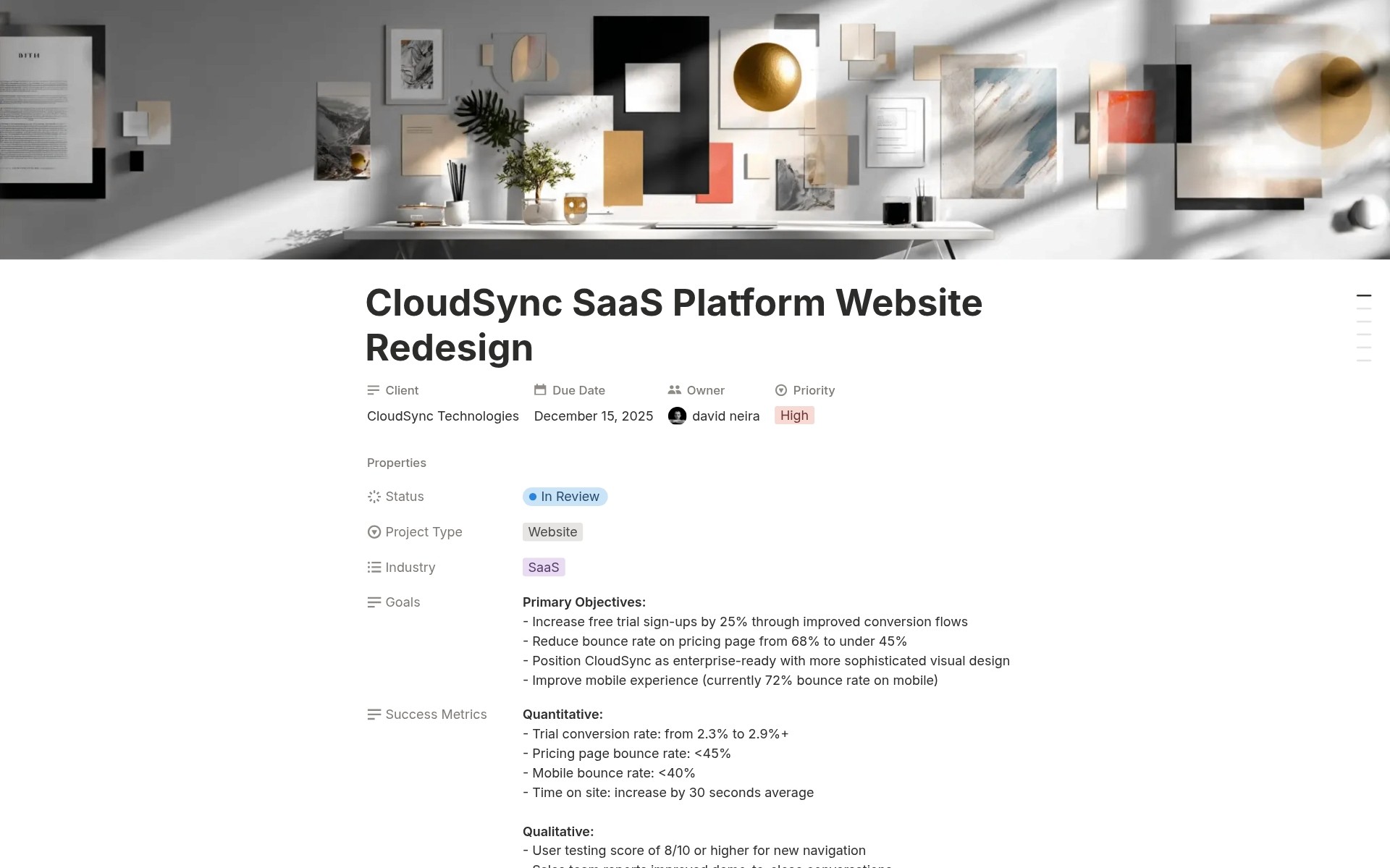
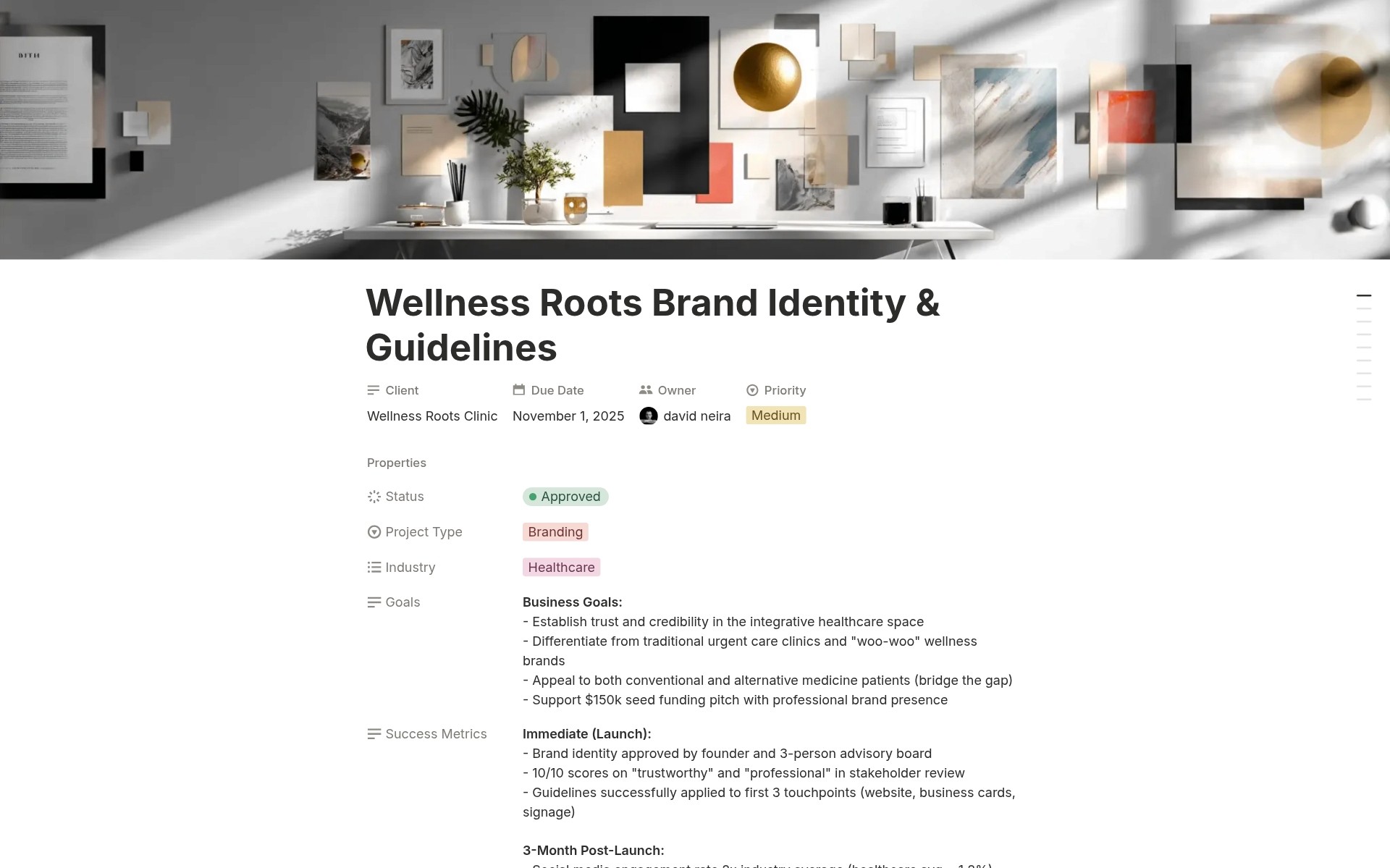
During kickoff, populate fields: Goals, Audience, Scope, Out of Scope, Constraints, Success Metrics, Budget, Industry, Channels.
Archive When Complete
Project finished. Change Status to Archived. Brief preserved as project documentation. Reference for similar future projects.
In one structured brief, you transform from scattered information chaos to organized project clarity.
Key Features
Comprehensive Brief Structure
25 Essential Properties
Every field design agency needs: client, type, goals, audience, scope, constraints, success metrics, risks, budget, timeline, rand esources. Nothing missing.
Single Source of Truth
All project information in one place. No more email archaeology. No scattered Google Docs. One URL shares everything.
Complete Context Capture
Not just "what" the client wants. Also "why", "who", "where", "when", "how much", "how measured" . Full picture.
Scope Management
Scope Field
What IS included in the project? List all deliverables explicitly. "Homepage design, 5 interior pages, mobile responsive, 3 revision rounds."
Out of Scope Field
What is NOT included? Prevent scope creep. "Development, content writing, photography, ongoing maintenance." Reference when the client requests additions.
Scope Creep Prevention
Projects stay on budget and timeline because the scope is defined and approved upfront. No surprise additions.
Goals and Success Metrics
Goals Field
What the client wants to achieve. "Increase brand awareness," "Generate qualified leads," "Improve user retention." Align design work to business objectives.
Success Metrics Field
How is success measured? "25% increase in conversions," "Reduce bounce rate to <40%," "Positive user testing scores." Data-driven outcomes.
Outcome Alignment
Design decisions reference goals and metrics. "We chose bold colors because the audience is Gen Z and the goal is brand differentiation."
Resource Organization
Brand Guidelines URL
Link to client brand assets, logos, color palettes, and typography. One click to brand standards.
Assets Folder URL
Link to project files: designs, source files, exports. Shared folder accessible to the whole team.
Drive Folder URL
Link to shared documents: contracts, meeting notes, and presentations. All project documentation is organized.
Risk Management
Risks & Assumptions Field
Document known issues upfront. "Client still developing product specs," "Tight deadline requires weekend work," "External vendor delays possible."
Proactive Communication
Risks documented = risks discussed with the client. No surprises later. Shared understanding of challenges.
Mitigation Planning
Identify risks early. Plan mitigation strategies. "Client specs incomplete = we'll work in phases with approval gates."
Creative Direction
References & Moodboard Field
Link to inspiration: competitor sites, Pinterest boards, Behance examples, Dribbble shots. Visual direction documented.
Constraints Field
Technical requirements, brand guidelines, legal restrictions, accessibility standards. Design parameters are clear.
Team Alignment
Designers, copywriters, and developers all see the same references. Consistent creative vision.
Budget and Timeline Tracking
Budget Field
Dollar-formatted budget property. Track project values. Organize by budget size. Plan resource allocation.
Start and Due Dates
Timeline properties for project scheduling. Calendar view shows all deadlines. Capacity planning.
Priority Levels
Low/Medium/High priority. Focus on urgent briefs. Communicate priorities to the team.
Industry and Channel Tracking
Industry Categories
Tag projects by industry (Ecommerce, SaaS, Fintech, Healthcare, Education, Hospitality, Nonprofit, Other). Multi-select for hybrid industries.
8 Channel Options
Tag where design executed (Website, Mobile App, Email, Social, Ads, Print, In-Product, Other). Multi-select for multi-channel projects.
Channel Specialization
Filter by channel. "Show all Social Media projects." Identify channel strengths. Market specialized services.
Perfect For
Design Agencies and Studios
Capturing client briefs for branding, website, product, and campaign projects systematically.
Freelance Designers
Professional brief documentation that matches agency standards for client work.
Creative Directors
Ensuring the team has a clear project direction before design work begins.
Account Managers
Managing client information and project scopes across multiple accounts.
Project Managers
Referencing a single source of truth throughout project execution.
Growing Design Teams
Standardizing the intake process as the team scales beyond the founder's memory.
Stop Guessing. Start Documenting.
Design Agency Client Briefs gives you 25 comprehensive properties capturing every detail from goals through success metrics, dedicated Scope and Out-of-Scope fields so you can point to documented boundaries when requests come mid-project, resource links providing one-click access to brand guidelines and assets, and status workflow tracking briefs from draft through approved so you stop losing critical information in email archaeology and start delivering every project with crystal-clear alignment from day one. Are you ready to stop watching scope creep destroy your profitability and start protecting every project with structured briefs that document exactly what the client asked for?