Design Agency Project Manager
Plan. Track. Deliver. Profit.
The complete project management system for design agencies who need to manage projects, tasks, budgets, time tracking, team capacity, and client relationships without scattered spreadsheets, missed deadlines, and budget overruns destroying profitability.
You're running a design agency. Three active projects. Deadlines approaching. Client asks: "How's the project going? Are we on budget?" You scramble. Check Slack. Dig through emails. Ask designers. "Think we're good?" You estimate: "About 70% done. Budget looks fine." Reality: The project is 50% done, already 90% over budget. Team overloaded. Deadline at risk. The project is completed 3 weeks late. Budget blown by $8K. Client unhappy. Team burned out. Profit margin is negative.
- Projects tracked across scattered spreadsheets, Slack threads, and email conversations - No real-time visibility into project progress, budget status, or team capacity - Burning through the budget without realizing until project completion - Team members are overloaded, while others are underutilized - Missing deadlines because tasks weren't properly tracked and assigned - Can't accurately answer "How's the project going?" or "Are we on budget?" - Hours worked are not tracked, making it impossible to calculate true project profitability - Feeling like you're flying blind on every project
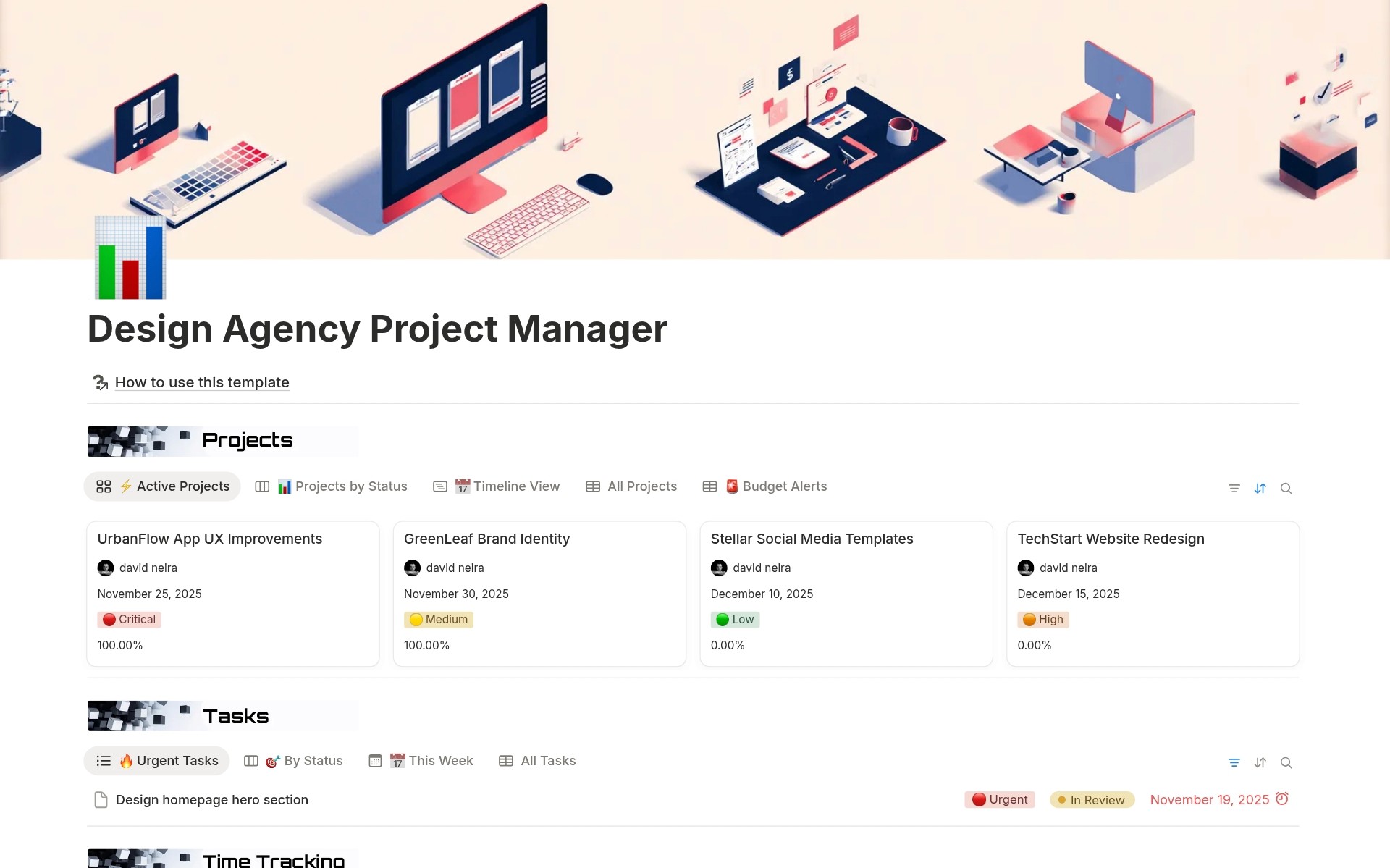
Instead of scattered spreadsheets and blind project management, you get a real-time dashboard: see exact project progress with automatic rollups, track budget health with color-coded alerts, monitor team capacity with availability formulas, log billable hours with one-click time tracking buttons, manage client revisions through structured workflow, and catch budget overruns before profit disappears. Answer "How's the project going?" with data, not guesses.
What´s Included
Projects Database
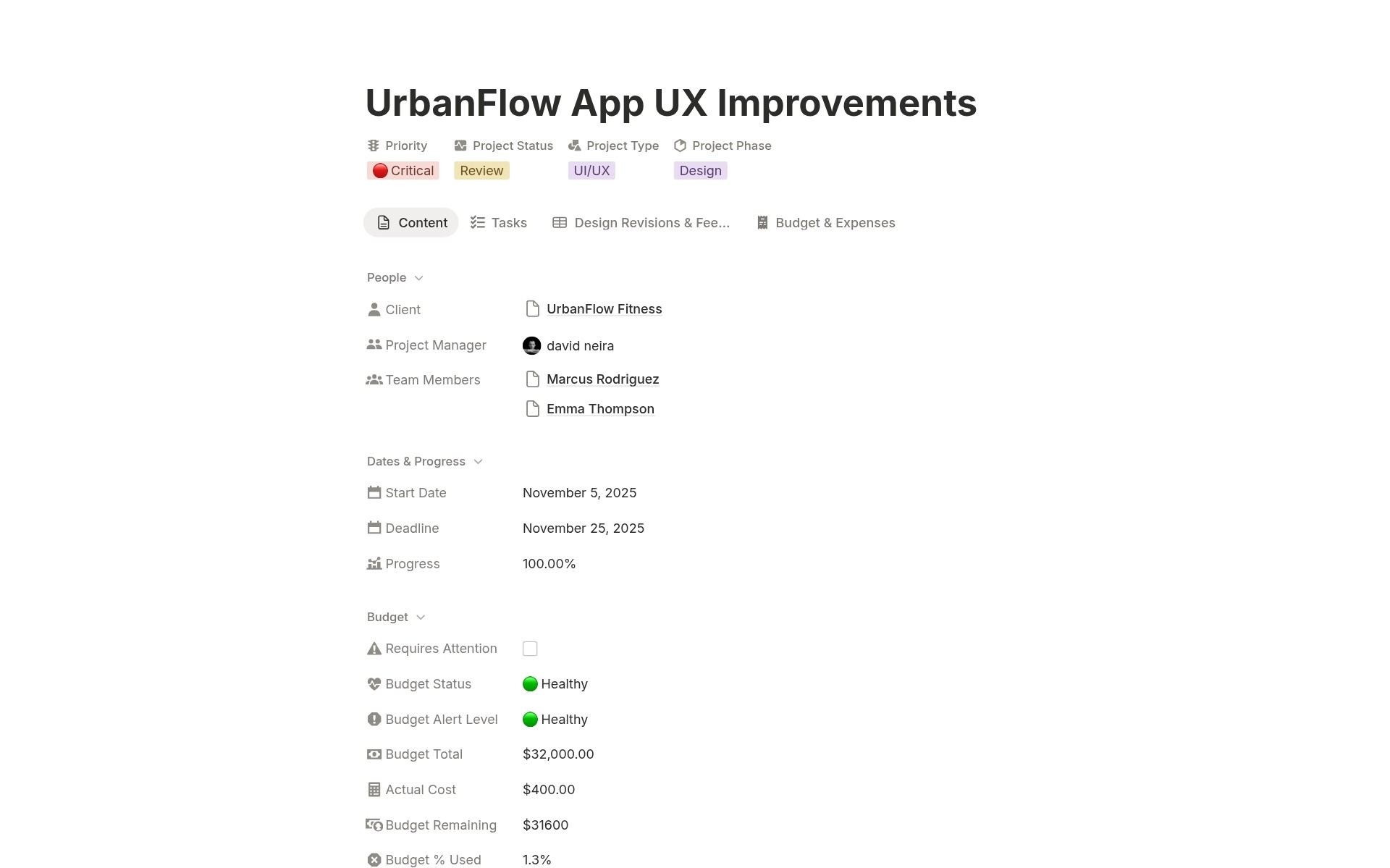
Complete project tracking with Project Name, Client relation, Project Status, Project Phase, Priority, Project Type multi-select, Start Date, Deadline, Project Manager assignment, Budget Total, Budget & Expenses relation, Tasks relation, Team Members relation, Design Revisions & Feedback relation, Client Brief text, Notes, Files & Assets upload, Actual Cost, Budget % Used, Budget Remaining, Budget Status, Budget Alert Level, Requires Attention, Progress. Complete project overview with automatic budget calculations.
Tasks Database
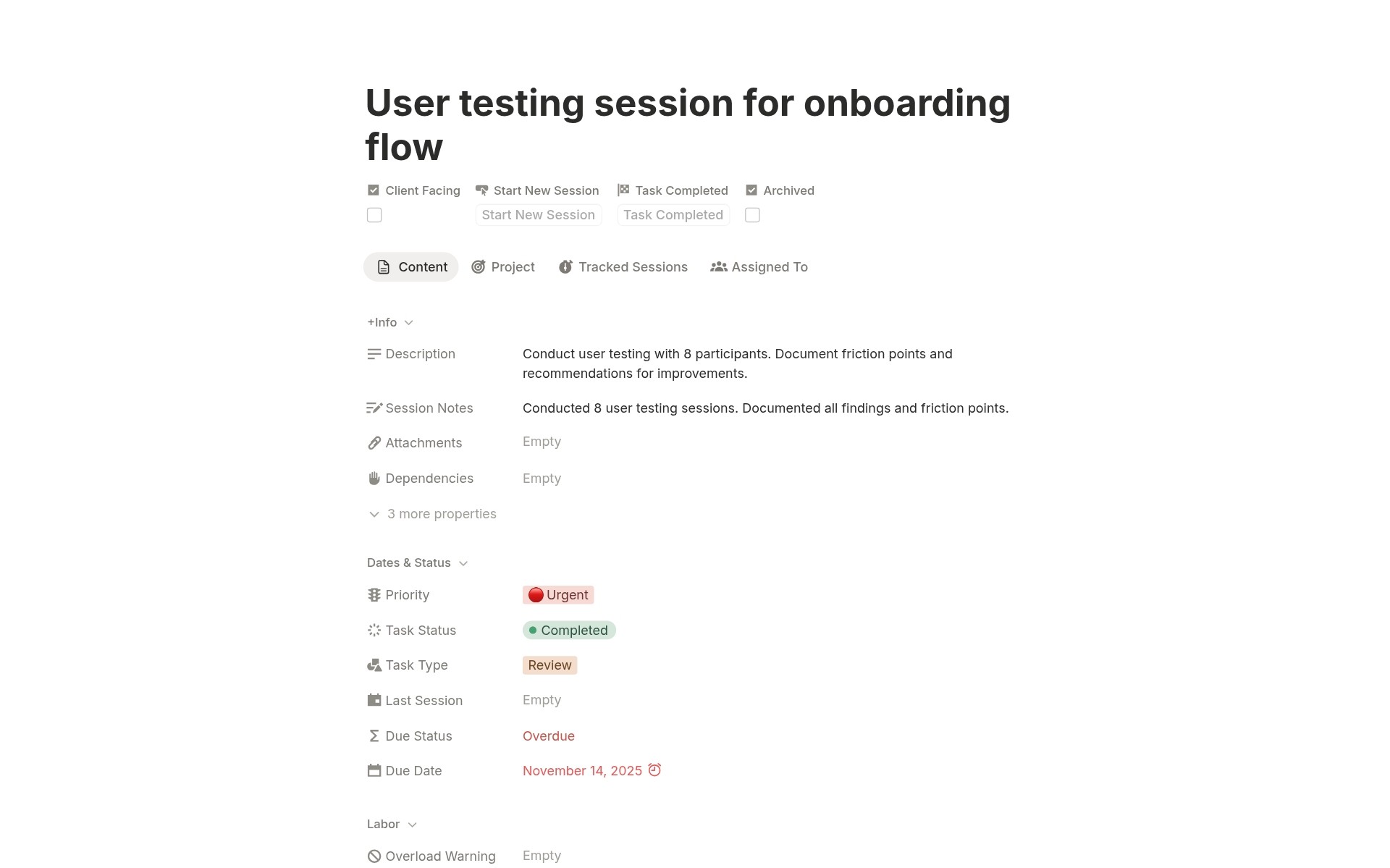
Advanced task management with Task Name, Project relation, Task Status, Task Type, Priority, Assigned To, Due Date, Estimated Hours, Description, Dependencies, Client Facing checkbox, Attachments upload, Tracked Sessions relation, Total Time, Labor Cost by Member, Total Labor Cost, Session Notes, Last Session date, Due Status, Overload Warning, Archived checkbox. Complete task tracking with time integration.
Time Tracking Database
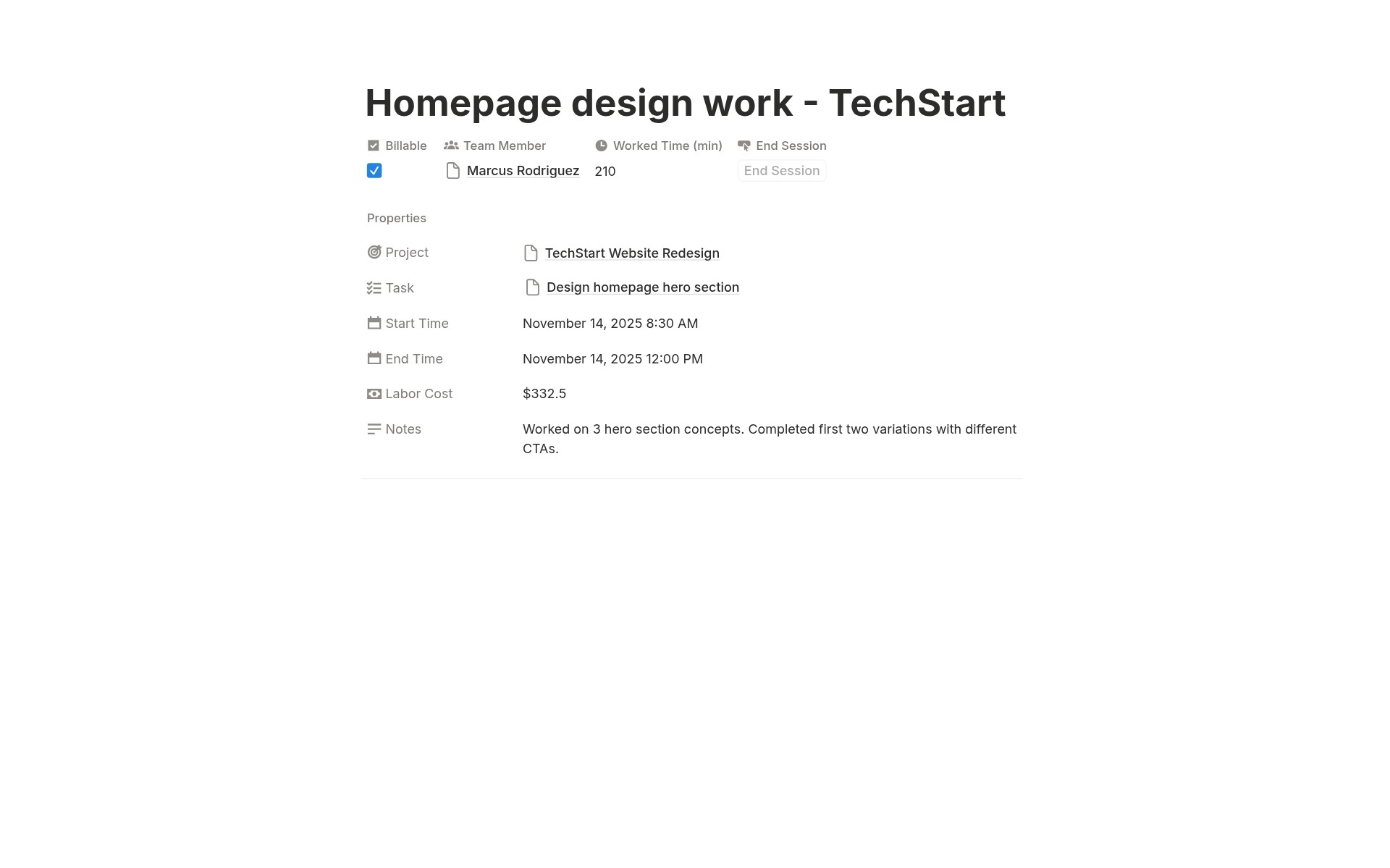
Detailed time logging with Entry Name, Task relation, Team Member relation, Start Time, End Time, Billable checkbox, Notes, Worked Time, Labor Cost, Project, End Session button. Accurate time tracking with automatic calculations.
Clients Database
Client management with Client Name, Client Status, Contact Person, Email, Phone, Company Website, Communication Preference, Feedback Style, Next Check-in date, Projects relation, Brand Assets relation, Contract Documents upload, Notes, Project Status. Complete client context.
Budget & Expenses Database
Expense tracking with Expense Name, Project relation, Client relation, Amount, Category, Date, Status, Billable to Client checkbox, Paid By person, Invoice/Receipt upload, Notes, Project Budget. Detailed budget management.
Design Revisions & Feedback Database
Revision workflow with Deliverable Name, Project relation, Client relation, Designer relation, Related Task relation, Status, Revision Round, Due Date, Approval Date, Design Files upload, and Feedback Notes. Structured approval process.
How It Works
Create Projects
Create Project entry. Set Project Name, link to Client, set Project Type, Priority, Status, Phase, Start Date, Deadline. Assign Project Manager. Set Budget Total. Add Client Brief, Notes, Files. Link Team Members. Project initialized.
Complete Project
All tasks completed. All time logged. All expenses recorded. Check Progress rollup. Check Budget Status. Mark Project Status as Completed. Archive tasks. Project closed.
In one integrated system, you transform from blind project management to data-driven operations with real-time visibility into progress, budget, and capacity.
Key Features
Automatic Budget Tracking
Real-Time Budget Calculations
Budget Total field. Actual Cost rollup. Budget % Used formula. Budget Remaining formula. Budget Status formula. Always know the exact budget health.
Budget Alert System
Budget Alert Level formula: ✅ Good (< 70%), ⚠️ Warning (70-90%), 🚨 Critical (> 90%). Requires Attention formula: Boolean true when > 85% used. Budget Alerts view: Filtered table showing only projects with Requires Attention = true. Focus on at-risk projects.
Expense-to-Project Rollup
Create expense. Link to Project. Amount automatically adds to the Project's Actual Cost rollup. Budget calculations update instantly. No manual spreadsheet updates.
Integrated Time Tracking
One-Click Time Logging
Start New Session button in the task. Creates a Time Tracking entry. Records start time automatically. Links to task, team member, and project. The End Session button records the end time. Worked Time calculated automatically. No manual time entry.
Automatic Labor Cost Calculation
Worked Time formula. Labor Cost formula. Total Labor Cost rolls up to the task. Accurate profitability tracking.
Billable Hours Tracking
Billable checkbox in Time Tracking. Filter for Billable Hours view. See only billable time. Calculate client invoices. Separate billable vs non-billable hours.
Team Capacity Management
Automatic Availability Calculation
Hours per Week field. Total Assigned Hours rollup. Capacity % Used formula. Availability formula: "Available" (< 70%), "Busy" (70-95%), "At Capacity" (≥ 95%). Know team utilization instantly.
Hours Available Formula
Hours per Week − Total Assigned Hours = Hours Available. "Sarah has 12 hours available this week." "Marcus is at capacity." "Emma is overloaded by 5 hours." Resource planning simplified.
Capacity Alert System
Capacity Alert formula: 🟢 (< 70%), 🟡 (70-95%), 🔴 (≥ 95%). Needs Review formula: Boolean true when > 95% capacity. Capacity Alerts view: Filtered table showing overloaded team members. Proactive workload balancing.
Progress Tracking
Automatic Progress Rollup
Progress rollup in Projects: Calculates the percentage of completed tasks. "8 of 12 tasks completed = 67% progress." No manual progress updates.
Task Status Workflow
5-status workflow: To Do (not started), In Progress (actively working), In Review (awaiting feedback), Blocked (can't proceed), Completed (done). Clear task lifecycle.
Dependencies Tracking
Dependency relation (task-to-task). "Task B depends on Task A." Track task blockers. Sequence work properly.
Client Management
Communication Preferences
4 preference options (Email, Slack, Phone, In-Person). "GreenLeaf prefers Email." "TechStart prefers Slack." "UrbanFlow prefers collaborative In-Person meetings." Communicate effectively.
Feedback Styles
4 style options (Detailed, Quick Approver, Requires Multiple Reviews, Collaborative). "GreenLeaf likes detailed explanations." "Stellar requires multiple review rounds." "UrbanFlow is collaborative hands-on." Set expectations.
Next Check-in Tracking
Next Check-in date field. "GreenLeaf check-in Nov 18." "Stellar check-in Dec 1." Never miss client touchpoints.
Design Workflow Features
Revision Workflow
4 revision rounds (R1, R2, R3, Final). 4 status options (Awaiting Feedback, In Review, Changes Requested, Approved). Track design iterations systematically.
Design Files Storage
Design Files upload in Revisions. Feedback Notes field. Approval Date tracking. Complete revision history.
Brand Assets Library
7 asset types (Logo, Color Palette, Typography, Brand Guide, Design System, Image Library, Templates). Version tracking. Files upload. Link URL. Organized brand resources.
Expense Management
7 Expense Categories
Labor (team hours), Software/Tools (subscriptions), Stock Assets (purchased media), Printing (physical print), Travel (transportation), Subcontractor (external freelancers), Other (misc). Complete taxonomy.
Payment Status Workflow
4 status options (Planned, Pending, Paid, Reimbursed). Track expense lifecycle. Invoice/Receipt upload for documentation.
Project Budget Rollup
Project Budget rollup in expenses. See the total project budget from the expense record. Context for expense size.
Perfect For
Design Agencies and Studios
Managing multiple client projects with budget tracking, time logging, and team capacity planning.
Creative Directors
Overseeing project portfolio, team workload, and ensuring on-time, on-budget delivery.
Project Managers
Coordinating tasks, tracking time, monitoring budgets, and managing client expectations.
Agency Founders
Gaining real-time visibility into project profitability, team utilization, and agency operations.
Freelance Designers
Managing client projects professionally with structured tracking and time billing.
In-House Creative Teams
Tracking internal projects, team capacity, and demonstrating creative team value.
Stop Guessing. Start Knowing.
Are you ready to stop flying blind and losing thousands on over-budget projects you didn't see coming, and start managing with real-time visibility and confidence because you know exactly where every project stands at any moment?