Employee Directory
Know Your Team. Connect Your People. Build Your Culture.
The complete employee directory system that helps growing teams organize contact information, track skills, and build meaningful connections without clunky HR software.
As your team grows beyond 10 people, keeping track of everyone becomes impossible. New hires don't know who to contact for what. Managers lose visibility into team skills and availability. Contact information lives in scattered spreadsheets, Slack profiles, and people's memories.
- New team members spend days figuring out who does what - Critical skills are hidden—you don't know who has expertise in specific areas - Contact information is outdated or impossible to find quickly - No clear reporting structure or organizational visibility - Onboarding new hires means manually sharing contact lists - Remote teams struggle to feel connected to colleagues they've never met
Employee Directory brings your entire team into one searchable, visual system where everyone can find anyone instantly. Instead of hunting through multiple tools or asking around, you see complete employee profiles with photos, contact details, skills, and reporting relationships in one beautiful directory. Smart gallery views automatically organize your team by department, location, or status so you always know who's who.
What´s Included
Pre-Built Gallery Views
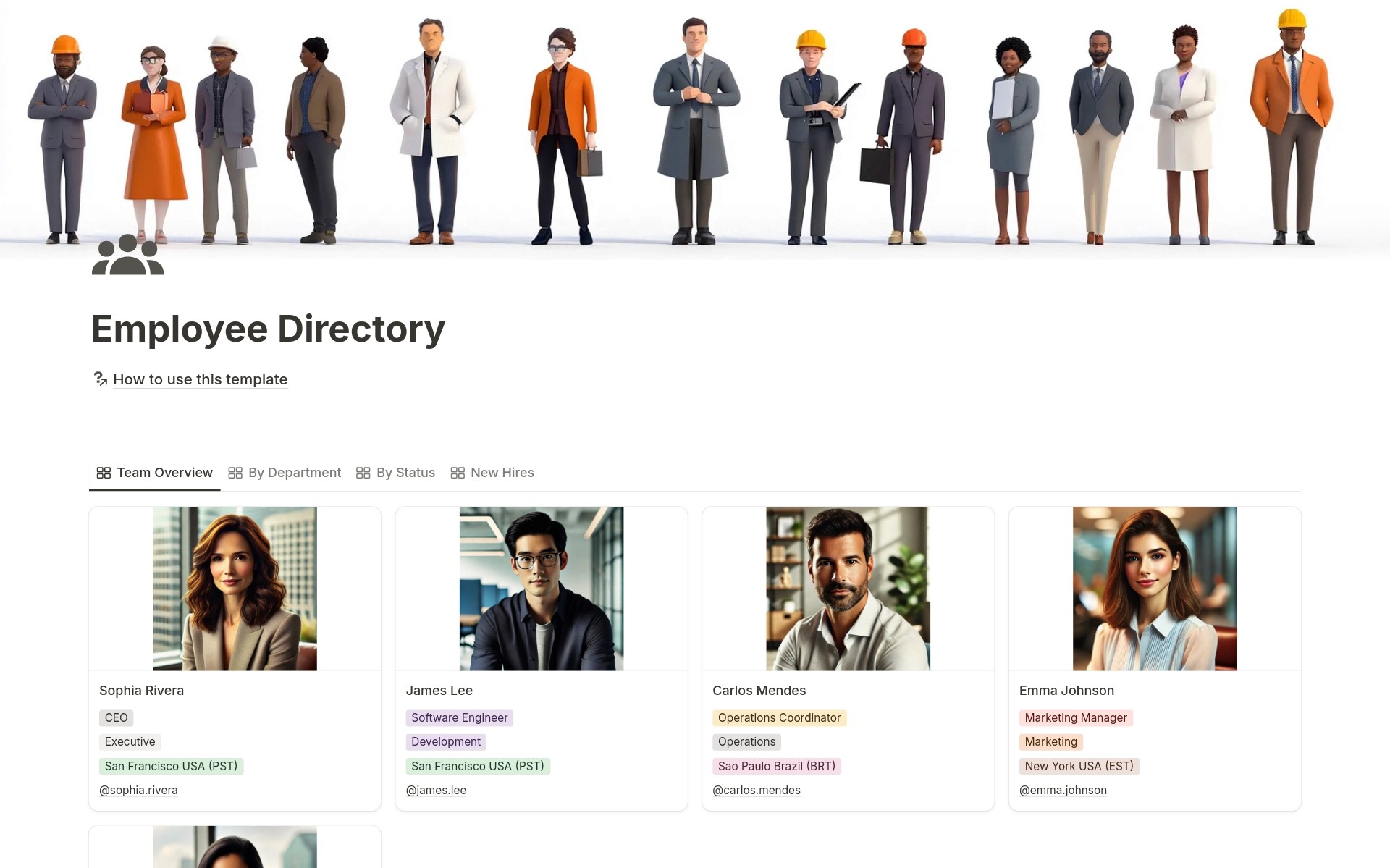
Team Overview shows everyone at a glance. By Department groups employees by their teams. By Status separates active employees from former team members. New Hires highlights recent additions to help with onboarding.
18 Employee Properties
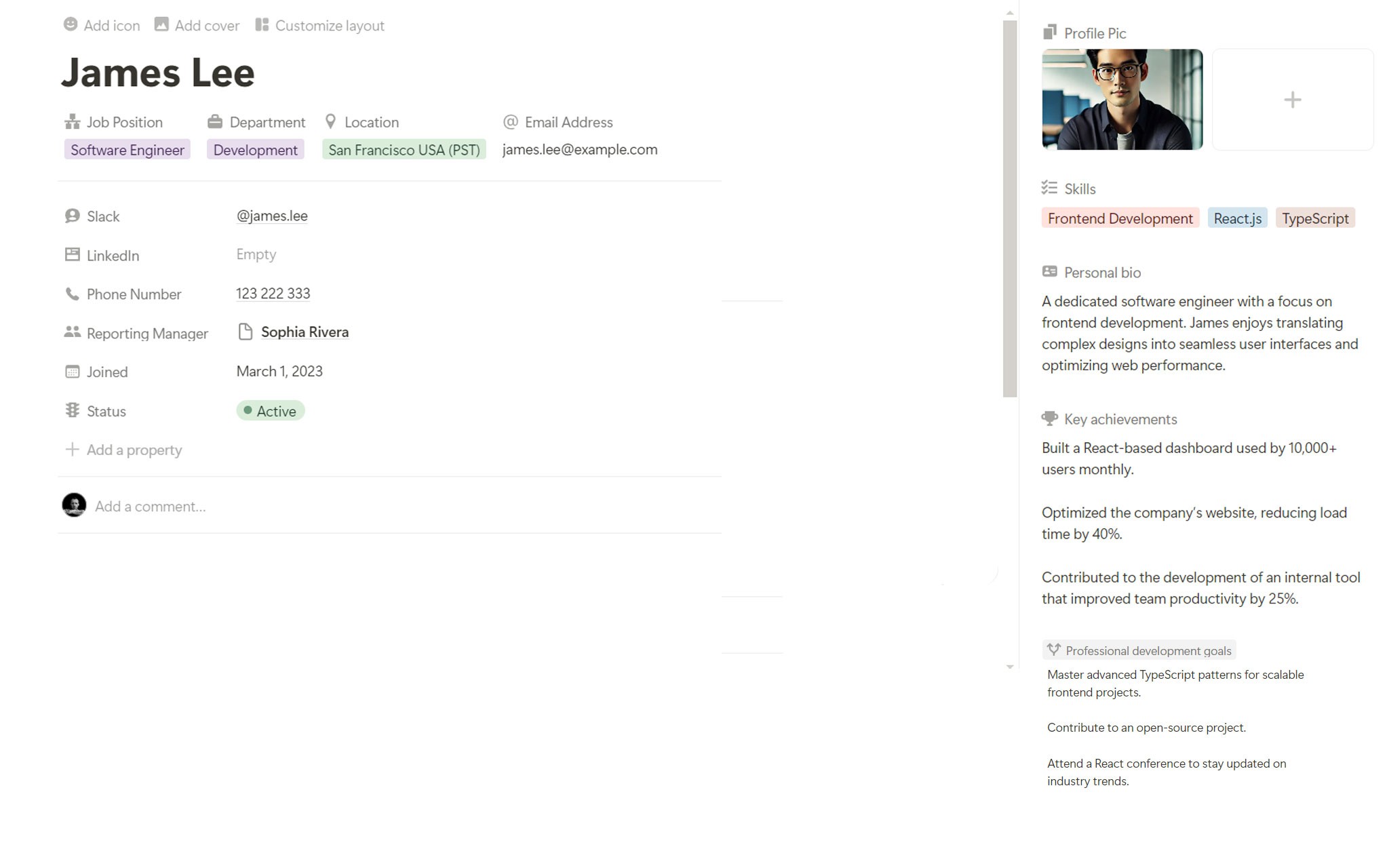
Capture profile pictures, job positions, departments, email addresses, phone numbers, Slack handles, LinkedIn profiles, locations with timezones, joining dates, reporting managers, skills, key achievements, professional development goals, and personal bios.
Pre-Configured Skill Tags
Ready-to-use skill categories, including leadership, marketing, development, HR, and operations skills, so you can immediately identify team expertise.
How It Works
Share and Connect
Give your team access to the directory. Everyone can search for colleagues, find contact information, and discover skills across the organization.
In less than 20 minutes, you'll have a complete employee directory that grows with your team.
Key Features
Comprehensive Employee Profiles
Complete Contact Information
Store email addresses, phone numbers, and Slack handles in one place. When someone needs to reach a team member, they find everything instantly without asking around or searching through old messages.
Visual Profile Pictures
Employee photos create a human connection, especially for remote teams. New hires can put faces to names immediately, and everyone feels more connected to colleagues they haven't met in person.
LinkedIn Integration
Link to professional LinkedIn profiles so team members can learn about each other's backgrounds, celebrate career milestones, and build professional relationships beyond daily work.
Skills and Expertise Tracking
Multi-Select Skill Tags
Tag employees with specific skills like "Frontend Development," "SEO," "Strategic Planning," or "Process Optimization." When you need expertise for a project, filter by skills to find the right person immediately.
Professional Development Goals
Track what skills each employee wants to develop. Managers can identify growth opportunities, and team members can find mentors with expertise in areas they want to learn.
Key Achievements Documentation
Celebrate wins by recording notable accomplishments in each employee's profile. This creates a culture of recognition and provides reference material for performance reviews.
Organizational Structure
Department Organization
Group employees by departments like Executive, Marketing, Development, HR, or Operations. Filter or view by department to understand team structure and identify who works in which area.
Reporting Manager Relationships
Link employees to their reporting managers to visualize organizational hierarchy. Everyone knows who reports to whom, making escalation paths and team structure crystal clear.
Location and Timezone Tracking
Record employee locations with timezone information like "San Francisco USA (PST)" or "London UK (GMT)." Remote teams can schedule meetings considerately and understand availability windows.
Smart Directory Views
Team Overview Gallery
See your entire team in a beautiful visual gallery with profile pictures, names, roles, departments, and locations. Perfect for all-hands presentations or quick reference when you need to find someone.
By Department View
Employees automatically group by department. See the Marketing team together, the Development team together, and so on. Great for understanding team composition and finding the right department contact.
New Hires Spotlight
Highlight recent additions to help existing team members welcome and connect with new colleagues. Makes onboarding more personal and helps new hires feel included faster.
Employee Self-Service
Personal Bio Space
Employees can share personal information like hobbies, interests, or fun facts. This humanizes your directory and helps team members connect beyond work tasks.
Joining Date Tracking
Record when each employee joined. Celebrate work anniversaries, understand team tenure, and recognize long-standing contributors automatically.
Easy Updates
Team members can update their own profiles when contact information, skills, or goals change. Your directory stays current without manual maintenance.
Perfect For
Growing Startups
Scaling from 10 to 50+ employees and need a professional way to organize team information without expensive HR software.
Remote-First Companies
Distributed teams who need a central place to connect faces to names and understand who works in which timezone.
Agencies and Consultancies
Project-based teams who need to quickly identify who has specific skills for upcoming client work.
HR and People Operations Teams
Managing employee information, onboarding new hires, and maintaining accurate organizational records.
Team Leads and Managers
Understanding your team structure, identifying skill gaps, and supporting professional development goals.
Stop Asking Around. Start Knowing.
Employee Directory gives you visual profiles with photos that connect faces to names, skills tracking that reveals hidden expertise across your team, complete contact information in one searchable place, and smart views that automatically organize by department or location so nobody ever wastes time asking "Who handles this?" Are you ready to stop losing time to scattered team information and start building a connected culture where everyone knows who does what?