Smart Notes
Your Second Brain. Finally Organized.
The complete note-taking system that helps you capture ideas, organize knowledge, and find anything instantly without scattered notebooks and forgotten insights.
You capture notes everywhere. Meeting insights in one app, personal ideas in another, research in browser tabs, work notes in email drafts. Brilliant thoughts vanish into digital chaos. Months later, you remember writing something important. But you can't find it. Was it in Apple Notes? Evernote? A random Google Doc? That Slack message to yourself? You waste 20 minutes searching or give up and lose the insight forever.
- Notes scattered across multiple apps, notebooks, and random documents - Brilliant ideas captured in the moment, then lost in digital clutter forever - No systematic way to organize knowledge by topic, project, or priority - Critical meeting notes are buried where you can't find them when needed - Important reference material disappearing into the void - Research and learning notes that never get reviewed or applied - Searching through hundreds of untitled notes, hoping to find something - Feeling like your note-taking creates more chaos than clarity
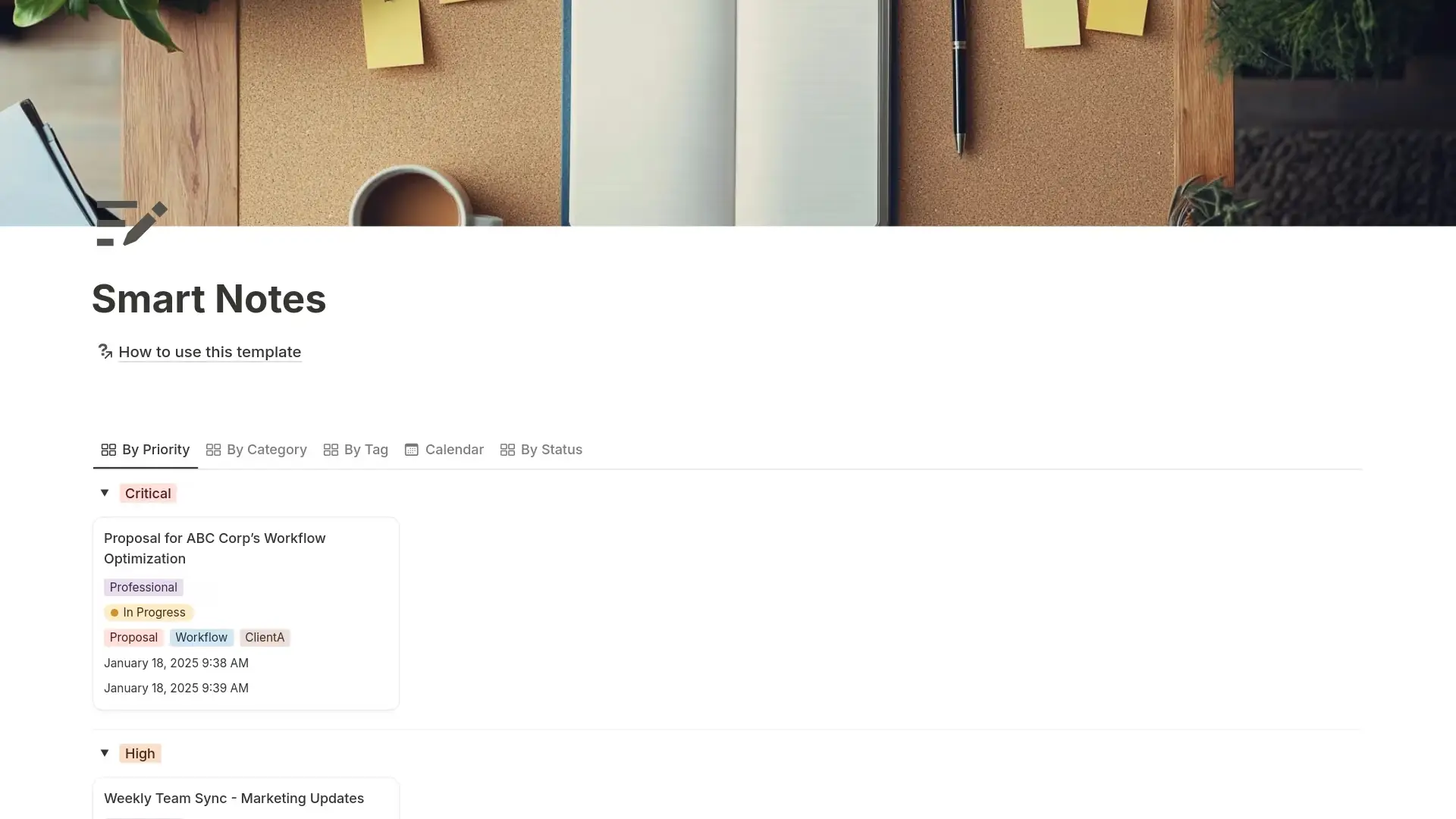
Smart Notes transforms scattered thoughts into an organized knowledge system where every note is categorized, tagged, prioritized, and instantly searchable when you need it. Instead of notes disappearing into chaos, you capture everything in one system with clear categories, flexible tags for cross-referencing, priority levels to surface what matters, status tracking from draft through archived, and multiple views that show your notes exactly how you need to see them.
What´s Included
Status Workflow
Track notes from Draft through In Progress to Complete or Archived. Know which notes are rough captures versus polished references, and which can be archived to keep your active workspace clean.
4-Level Priority System
Mark notes as Critical, High, Medium, or Low priority. Surface your most important insights instantly without scrolling through hundreds of entries.
5 Preset Categories
Organize notes as Personal, Academic, Professional, Meeting, or Research. Filter by category to see only meeting notes, only research, or only personal reflections.
Related Links Integration
Add URLs to connect notes with external resources, project documents, research sources, or related content. Turn isolated notes into connected knowledge.
Attachments Documentation
Track files, images, or documents associated with each note. Remember what resources belong with which insights.
Automatic Timestamps
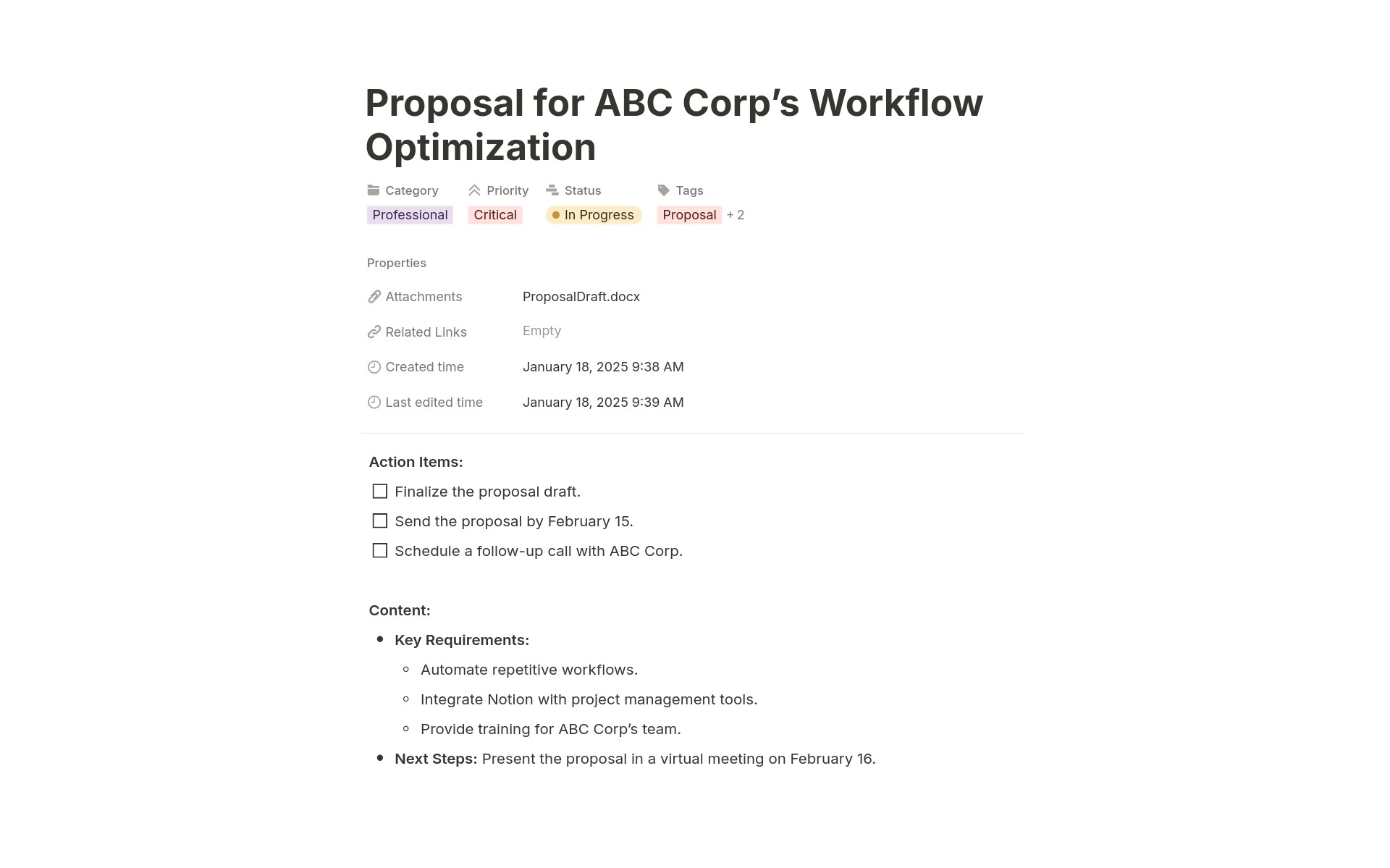
Creation and last-edited times are tracked automatically. Know when you captured an idea and when you last updated it. Find recent notes in calendar view.
How It Works
Organize Systematically
Set the category (Meeting, Research, Personal, etc.), add relevant tags, mark priority level, and update status. Your note automatically appears in all relevant views.
Find Instantly
When you need information, filter by category, tag, or priority, and use calendar view to find notes from specific timeframes. Use the search to find anything by keyword. Your knowledge is always accessible.
In less than 5 minutes, you'll start capturing notes that actually stay organized instead of disappearing into chaos.
Key Features
Systematic Organization
Category-Based Structure
Every note belongs to a category: Personal (life, goals, reflections), Academic (studies, courses), Professional (work, career), Meeting (discussions, decisions), or Research (learning, investigation). Filter to any category to see only relevant notes.
Priority-Driven Visibility
Mark Critical notes that need immediate attention, High priority for important information, Medium for standard notes, Low for nice-to-have captures. The By Priority view surfaces urgent content automatically.
Flexible Tag Customization
Included tags cover common needs (Ideas, Project, Marketing, Productivity), but you can add client names, project codes, or any custom tags your workflow requires.
Status Workflow
Draft to Complete Progression
Capture rough thoughts as a draft. Mark In Progress as you develop ideas. Set Complete when notes are polished and references. Archive when no longer active. Know exactly where each note stands.
Active Workspace Management
The Status view shows Draft notes needing development, In Progress notes being refined, and Complete notes ready for reference. Archive old content to keep your active workspace focused without losing historical knowledge.
Work-in-Progress Tracking
See which notes are In Progress across all categories. Never lose track of ideas you started developing but haven't finished.
Powerful Discovery
Multiple View Perspectives
By Priority when you need to see what's urgent. By Category when you want all meeting notes or all research. By Tag when you need cross-cutting organization. Calendar when you remember roughly when you captured something.
Tag-Based Cross-Referencing
Tag notes as both Marketing + Ideas to find marketing brainstorms. Tag as Work + Important + Proposal to surface critical business documents. Multi-select tags create infinite organization possibilities.
Time-Based Navigation
Calendar view shows notes by creation date. Review what you captured last week, find notes from a specific conference, or browse your knowledge chronologically.
Connected Knowledge
Related Links
Connect notes to external resources, project documents, research papers, or other web content. Turn isolated notes into nodes in a connected knowledge graph.
Attachments Tracking
Document files, images, or resources associated with each note. Remember that the strategy note has the PDF, or the meeting note references the shared spreadsheet.
Cross-Note References
Mention other notes within note content using Notion's @ mentions. Create connections between related ideas, reference previous meeting notes, or link research to project notes.
Temporal Intelligence
Automatic Timestamp Tracking
Creation time and last edited time are captured automatically. Know when you first had an idea and when you last refined it. Find notes that need updating based on staleness.
Calendar-Based Review
Calendar view shows all notes by creation date. Review your knowledge capture patterns, find notes from specific events, or browse what you were thinking about in different time periods.
Recency Sorting
Sort by Last edited time to see recently updated notes. Sort by Created time to see newest captures. Temporal organization helps you find recent work fast.
Visual Organization
Gallery Card Layouts
Beautiful card-based views make browsing notes feel natural. Scan titles, categories, tags, and timestamps at a glance without opening individual notes.
Grouped Board Views
Notes automatically group by Priority, Category, Tag, or Status in kanban-style boards. See all Critical notes together, all Meeting notes together, or all Ideas together.
Clean, Scannable Interface
Card displays show exactly what you need: title, category, status, tags, timestamps. No visual clutter. Find what you're looking for with rapid scanning.
Flexible Customization
Add Your Own Categories
The template includes Personal, Academic, Professional, Meeting, and Research, but you can add Creative, Technical, Strategy, or whatever categories match your needs.
Custom Tag Creation
Start with 17 included tags and add unlimited custom tags for clients, projects, topics, or any classification system that serves your workflow.
Additional Properties
Add custom properties for projects, people, locations, due dates, or any metadata that helps you organize and find notes.
Perfect For
Knowledge Workers
Capturing meeting notes, project insights, and professional knowledge daily, and needing systems that keep everything organized and searchable.
Students and Academics
Taking lecture notes, research notes, and study materials across multiple subjects and needing organized knowledge bases that support learning.
Researchers and Writers
Collecting research, ideas, quotes, and references for writing projects and needing systems that make retrieval effortless.
Entrepreneurs and Founders
Capturing business ideas, strategy notes, meeting insights, and learning across all aspects of building companies.
Consultants and Professionals
Managing client notes, proposal ideas, project documentation, and professional development learning in organized systems.
Lifelong Learners
Capturing insights from books, courses, podcasts, and experiences, and wanting personal knowledge bases that compound over time.
Stop Searching. Start Finding.
You've wasted hours looking for notes you know you wrote. That brilliant meeting insight? Lost in Apple Notes. That important research? Buried in a random Google Doc. You're not bad at note-taking, you just don't have a system that keeps everything organized and findable. Smart Notes captures everything in one place with systematic categories, multi-dimensional tags, priority levels, and multiple views that show your knowledge exactly when you need it. Are you ready to stop losing insights to digital chaos and start building an organized knowledge base?